

For a fleet manager, the useful question is not simply “How does GPS work?” It is “How does a position calculated inside a vehicle become reliable information on a fleet dashboard?” This guide follows that complete data path and explains what GPS can measure, what requires additional sensors, how accurate tracking is, and how to choose a system for commercial operations.
Geofencing is a location-based technology that creates a virtual boundary around a real-world area. When a GPS-equipped vehicle or asset enters, leaves or remains inside that boundary, fleet software can record the event and trigger an alert, report or automated workflow. Fleets use geofencing to confirm arrivals, measure dwell time, detect unauthorized movement and improve route and site control. Most fleets begin using vehicle tracking to answer one question: where is the vehicle now? Geofencing adds operational context. It helps answer whether a vehicle reached the correct customer, left a depot outside working hours, remained too long at a loading point or entered a restricted area — without requiring a dispatcher to watch the map continuously. Geofencing is therefore not a replacement for GPS tracking. It is a rule-based layer that turns location data into events a business can act on. It is also one of the practical functions inside a broader vehicle telematics system, where location can be combined with ignition, speed, fuel, temperature, driver identity and other sensor data.
Table of Contents
Most fleets begin using vehicle tracking to answer one question: where is the vehicle now? Geofencing adds operational context. It helps answer whether a vehicle reached the correct customer, left a depot outside working hours, remained too long at a loading point or entered a restricted area — without requiring a dispatcher to watch the map continuously.
Geofencing is therefore not a replacement for GPS tracking. It is a rule-based layer that turns location data into events a business can act on. It is also one of the practical functions inside a broader vehicle telematics system, where location can be combined with ignition, speed, fuel, temperature, driver identity and other sensor data.
Key takeaways
- A geofence is the virtual boundary; geofencing is the workflow built around that boundary.
- Common fleet geofence shapes include circles, polygons and route or line corridors.
- Entry, exit and dwell events can generate alerts, reports, tasks or API calls.
- Accuracy depends on the underlying position data, reporting interval, site geometry and rule configuration.
- Buffers and dwell conditions can reduce false alerts, but their values should be tested for each site and use case.
- Security zones and operational zones should not use exactly the same rules.
What is a geofence?
A geofence is a virtual perimeter defined by geographic coordinates and placed over a real location on a digital map. It may represent a depot, customer site, port, construction area, route, fuel station, city boundary or restricted territory.
Geofencing is the process of monitoring how tracked vehicles or assets interact with these boundaries. The distinction is useful when planning a system: the geofence is an object on the map, while geofencing includes the conditions, notifications, reports and business actions connected to it.
For example, drawing a polygon around a warehouse creates a geofence. Configuring the system to record the first entry, wait until the vehicle has remained on site, notify a dispatcher about an unexpected exit and send the event to an ERP creates a geofencing workflow.
Types of geofences used in fleet tracking
The correct shape depends on what the zone is intended to represent. Wialon Hosting, for example, supports circle, polygon and line geofences in its current interface.
| Geofence type | How it is defined | Best used for | Main consideration |
|---|---|---|---|
| Circle | A centre coordinate and radius | Customer addresses, fuel stations, checkpoints and simple points of interest | A large radius may overlap nearby roads or properties |
| Polygon | Multiple coordinate points forming a closed area | Depots, ports, quarries, warehouses and irregular sites | The boundary should follow the operational area, not just the property outline |
| Line or corridor | A line or saved route with a defined width | Route compliance, approved roads and border corridors | The corridor must allow for normal GPS variation and road geometry |
A useful starting principle is to use circles for individual points and polygons for physical sites. A route corridor is more appropriate when the operational question is not whether a vehicle visited a place, but whether it remained close to an approved route.
Some platforms also allow temporary zones, groups of zones or nested areas. Availability and limits depend on the platform, account and tracking device.
How does geofencing work?
Fleet geofencing combines GNSS positioning, a tracking device, data transmission and rule logic in a software platform.
- The GNSS receiver in the tracker calculates the vehicle’s position using available satellite signals.
- The tracker combines the position with relevant data such as time, speed, ignition or sensor values.
- The device sends a message through a cellular or satellite connection, immediately after an event or at a configured interval.
- The tracker or fleet platform checks whether the reported position is inside or outside the selected boundary.
- When the defined condition is met, the system records an event or performs an action such as sending an alert, adding a report row, creating a task or calling an external API.

Device-side vs server-side geofencing
The boundary comparison may happen inside a compatible tracker or in the fleet platform. Support varies by hardware and software, and the two approaches should not be treated as interchangeable.
| Device-side geofencing | Server-side geofencing | |
|---|---|---|
| Where the zone logic is stored | In compatible tracker memory | In the fleet platform |
| Detection without connectivity | The device may detect and buffer the event locally | The platform cannot evaluate a position until it receives the message |
| Remote notification | Requires connectivity to reach the platform or recipient | Can be sent when the platform receives the triggering message |
| Number of zones | Constrained by device memory and firmware | Not constrained by tracker memory; platform or account limits may apply |
| Rule complexity | Usually limited to supported device functions | Can combine zones with schedules, groups, speed, sensors, drivers and workflows |
| Typical role | Critical local rules and offline event capture | Operational reporting, dashboards, notifications and integrations |
Device-side detection does not mean that a dispatcher receives an alert while the vehicle has no connection. It means that a compatible tracker can identify and store the event locally. The remote alert can be delivered only after communication is available again.
Many projects rely primarily on server-side geofencing because it is easier to manage at scale. Device-side zones can be useful where the hardware supports them and local detection is operationally important.
Why the reporting interval matters
A server-side platform evaluates the positions it receives. At a 60-second reporting interval, a vehicle travelling at 80 km/h covers approximately 1.3 km between scheduled messages. The exact boundary-crossing time may therefore differ from the timestamp of the first reported point inside or outside the zone.
The software may connect reported points visually, but it should not be assumed that every platform reconstructs or validates the complete path between them. Coverage gaps can create a much larger delay than the normal reporting interval.
Shorter intervals provide more location detail but increase data, power and platform processing requirements. Event-based reporting can improve the balance: compatible trackers may send a message after ignition changes, direction changes, harsh driving events or locally detected zone crossings, while using a longer heartbeat interval at other times.
The correct configuration depends on the business decision. A security alert, proof of arrival and monthly utilization report do not require the same reporting strategy.
Geofence triggers and automated actions
A zone becomes useful only when its events are connected to a clear business action.
| Trigger | Possible action | Business purpose |
|---|---|---|
| Vehicle enters a customer zone | Record arrival and update order status | Proof of service and ETA control |
| Vehicle leaves a depot outside its schedule | Send a high-priority alert | Unauthorized-use or theft response |
| Vehicle remains inside a site for a defined period | Calculate dwell time and include it in a report | Loading, waiting-time and productivity analysis |
| Vehicle exceeds a speed limit inside a site | Register a violation and notify a safety manager | Yard and industrial-site safety |
| Vehicle leaves an approved route corridor | Alert a dispatcher or create an exception | Route compliance and cargo security |
| Fuel level rises inside an approved fuel-station zone | Register a possible refuelling event | Fuel reconciliation |
| Fuel level drops sharply outside an expected operating context | Create an exception for review | Possible fuel loss or drain investigation |
The words possible and for review matter. A geofence provides context, not proof by itself. A reliable fuel workflow, for example, should combine location with a calibrated fuel-level sensor, ignition state, time and the fleet’s operating rules.
How accurate is geofencing?
Geofencing is only as accurate as the location data and rules underneath it. GPS.gov notes that accuracy can be degraded by signal blockage from buildings, bridges and trees, indoor or underground use, reflected signals and receiver quality. A smartphone may achieve accuracy within several metres under open sky, but there is no single accuracy figure that applies to every fleet tracker, installation and site.
Three common patterns can produce unwanted events.
GPS drift on a stationary vehicle. A parked vehicle close to a boundary can report slightly different positions as satellite geometry and signal conditions change. The platform may then see repeated entry and exit states even though the vehicle did not move.
Boundary hugging. A loading bay or parking position lies directly on the drawn edge. Small position changes repeatedly move the point from one side of the boundary to the other.
Pass-by events. A circular zone overlaps a public road, and a tracked fleet vehicle passes the site without actually visiting it.
Ways to reduce false alerts
- Use an appropriate buffer. A buffer can keep normal position variation away from the boundary. Values such as 20–50 metres may be tested as starting points, but the correct value depends on the site, surrounding buildings, device and business purpose.
- Add a dwell condition. Requiring the vehicle to remain inside or outside the zone can separate an actual visit from a pass-by. A 60–180 second threshold may be a useful test range for some arrival workflows, not a universal standard.
- Use ignition or movement context carefully. Requiring ignition to be on can reduce operational exit noise, but a security rule may need to detect towing or movement while ignition is off.
- Add a speed condition where appropriate. A high-speed crossing may be treated as a pass-by, but the threshold must match the road and site.
- Test with real trips. Drive into, through and out of the zone; compare system timestamps with what happened; and review overnight data before deploying the rule to the full fleet.

Alert fatigue is a configuration problem
If every normal movement becomes an alert, managers quickly stop treating notifications as actionable. The goal is not to send the maximum number of messages. It is to ensure that every real-time alert reaching a person has a clear owner and expected response.
Routine events can be stored for daily or weekly reporting. Real-time channels should be reserved for exceptions such as after-hours movement, a restricted-zone entry, a serious route deviation or a delayed arrival that requires intervention.
What is geofencing used for in fleet management?
| Sector | Example workflow | What the fleet measures |
|---|---|---|
| Transport and logistics | Customer-site entry and exit | Arrival, departure, dwell time and route execution |
| Construction and quarrying | Equipment-site boundary | Unauthorized movement, site utilization and time on job |
| Fuel and bulk liquids | Fuel-station or depot zone combined with sensor data | Fuel filling or drain events in location context |
| Cold chain | Customer/depot zones combined with temperature and door data | Temperature exceptions by location and delivery stage |
| Vehicle rental and leasing | Permitted operating area or border zone | Contract exceptions and cross-border movement |
| Utilities and field service | Service-address zones | Jobs visited, time on site and technician productivity |
| Passenger and school transport | Depot, route and stop zones | Route adherence and arrival notifications |
| Municipal fleets | Route corridors and service areas | Coverage, missed locations and restricted access |

Geofencing becomes more valuable when it is combined with other information. A location event can be linked to fuel, temperature, door, driver or video data. TAI Capital’s fuel monitoring solutions can, for example, add measured tank data to the location context so that a fleet can distinguish normal operational changes from events that require investigation.
Benefits of geofencing for fleets
The main benefits come from replacing manual checks with consistent, time-stamped events.
- Better operational visibility: managers can see which required locations were visited and when.
- More reliable proof of service: arrival, departure and dwell records reduce dependence on driver calls or manual timestamps.
- Faster exception response: high-priority security or route events can reach the responsible person quickly.
- Improved utilization analysis: time spent at depots, customer locations and job sites can be compared across vehicles and routes.
- Stronger route and site control: fleets can monitor restricted areas, approved corridors and operating schedules.
- More useful customer communication: arrival events can support status updates and more accurate ETAs.
- Better data for integrations: geofence events can update orders, tasks, ERP records or customer-facing systems.
Useful KPIs include average dwell time, on-time arrival rate, number of unauthorized trips, missed locations, route-deviation events, after-hours movements and response time to critical alerts. The KPI should be selected before the notification is configured; otherwise the platform may collect events without helping anyone make a decision.
GPS tracking vs geofencing vs telematics
| Technology | Main question | Typical output |
|---|---|---|
| GPS tracking | Where is the vehicle and where has it travelled? | Current location, route history, speed and stops |
| Geofencing | Did the vehicle enter, leave or remain inside an area that matters? | Entry, exit, dwell and route-deviation events |
| Telematics | What is happening with the vehicle, driver and operation? | Location plus fuel, diagnostics, sensors, safety, video and analytics |
GPS tracking supplies the position. Geofencing applies rules to that position. Telematics connects location with the wider operational data set. Businesses dealing with fuel, safety, maintenance or sensor data usually need more than a basic map; the broader differences are explained in TAI Capital’s guide to vehicle and fleet telematics.
How do you set up a geofence correctly?
The interface differs by platform, but the planning sequence is consistent.
- Define the business event. Decide whether the zone confirms arrival, detects an exception, measures dwell time or supports reporting.
- Choose the location and vehicles. Identify the site, route, asset groups and operating schedule covered by the rule.
- Choose the geometry. Use a circle for a point, a polygon for an irregular site or a line/corridor for route control.
- Draw and review the boundary. Use map or satellite context and check whether the zone overlaps public roads, neighbouring properties or unrelated operating areas.
- Configure conditions. Choose entry, exit, presence, schedule, dwell, speed, ignition, sensor or driver conditions that support the business event.
- Assign actions and recipients. Decide whether the event belongs in a report, email, SMS, app notification, task or integration — and who must respond.
- Test before scaling. Run real trips, compare timestamps, review false events and adjust the boundary and conditions.
- Review zones periodically. Customer sites, projects and routes change. Remove or update zones that no longer represent current operations.
A geofence is configured well when it represents the real operational area, produces an event the business can interpret, avoids unnecessary notifications and has an owner responsible for reviewing the result.
How geofences are created in Wialon
Wialon Hosting currently allows users to create circle, polygon and line geofences from the Geofences tab. The platform also supports geofence groups, reports for visited and non-visited zones, routes and notification rules.
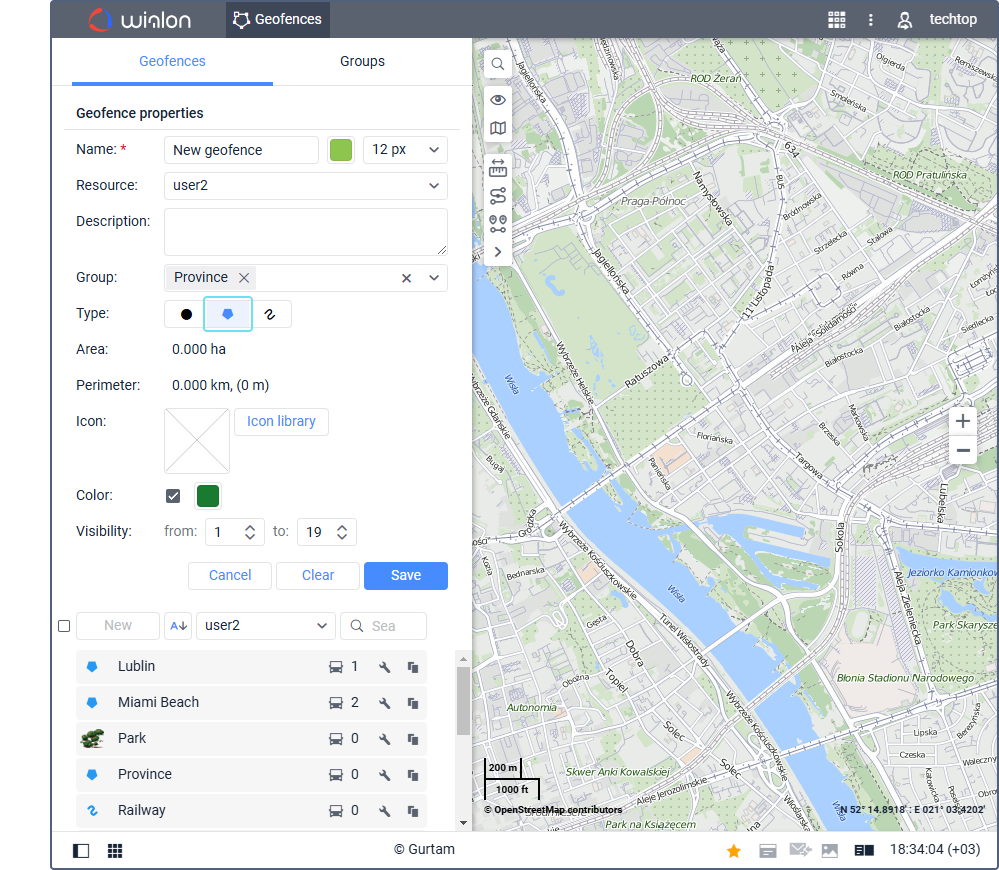
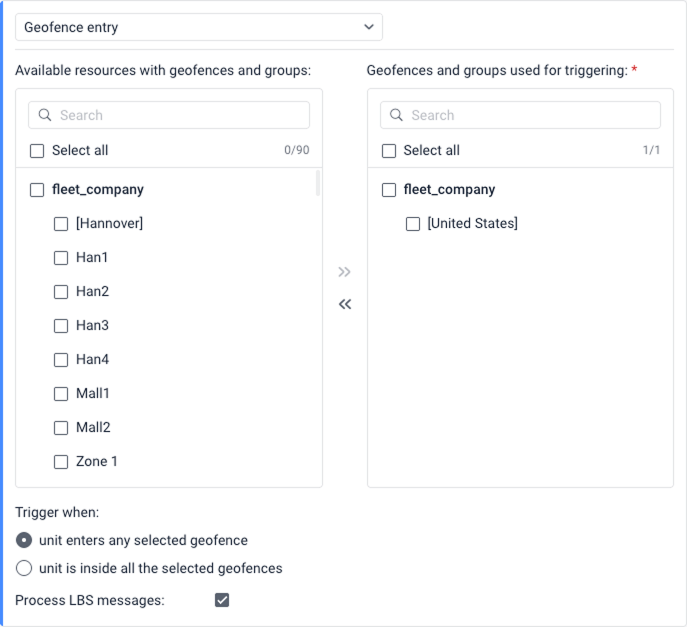
After the zone is created, a notification can use geofence entry or exit as a condition. In Wialon, these conditions can also be combined with supported values such as speed or sensor readings, depending on the notification configuration.
TAI Capital can help select compatible GPS tracking equipment, configure Wialon fleet management and connect geofence events with fuel, safety, maintenance and operational reporting requirements.
What to look for in fleet geofencing software
Before choosing a platform, evaluate the workflow rather than only the map interface.
- circle, polygon and route/line geofences;
- entry, exit and presence conditions;
- schedules, time windows and vehicle groups;
- combinations with speed, ignition, drivers and sensors;
- bulk import/export and zone grouping;
- mobile, email, SMS and in-platform alerts;
- escalation and acknowledgement options;
- visited, non-visited, dwell-time and route reports;
- user roles and audit history;
- API, ERP, dispatch and customer-system integrations;
- offline message buffering and transparent device compatibility limits;
- local implementation, testing and ongoing technical support.
The best system is not the one with the longest feature list. It is the one that can represent the fleet’s actual sites, routes, risks and response processes without producing unnecessary operational noise.
Geofencing limitations and privacy considerations
Positioning gaps. Tunnels, underground parking, indoor areas and dense high-rise environments can reduce or temporarily remove a satellite fix. Some trackers support dead reckoning or LBS positioning, but these methods have their own limitations and should not be described as equivalent to a normal GNSS fix.
Communication gaps. A tracker may store messages while cellular coverage is unavailable, but the platform and dispatcher do not receive a live event until communication returns. Critical workflows should define what happens during and after an outage.
Hardware and installation quality. Antenna placement, power supply, device firmware, environmental protection and reporting configuration can affect the result. A software rule cannot compensate for unreliable source data.
Changing operations. Customer sites move, construction projects end and approved routes change. Zone libraries should have an owner and review schedule.
Privacy and access. Location data linked to an identifiable driver may be treated as personal data. Fleet operators should define a lawful operational purpose, inform affected personnel, restrict access by role, protect accounts and integrations, and set appropriate retention rules under the laws that apply to their operations. Requirements vary by jurisdiction, including under the UAE’s data-protection framework, so legal conclusions should be verified for the specific deployment.
Driver acceptance. Explain what is monitored, why it is needed, who can access the data and how the information will be used. Transparent policies reduce disputes and make operational reports more credible.
Frequently asked questions
What is geofencing in simple terms?
Geofencing means drawing a virtual boundary around a real place and creating a rule for what should happen when a tracked vehicle or asset enters, leaves or remains inside that area.
How does geofencing work in fleet management?
A GPS or GNSS tracker calculates the vehicle’s position and sends it to a fleet platform. The device or platform compares the position with a defined zone. When the configured condition is met, the system records an event or performs an action such as sending an alert or adding data to a report.
What is the difference between GPS tracking and geofencing?
GPS tracking provides location and route data. Geofencing applies rules to that location data and identifies interactions with places or routes that matter to the business.
Does geofencing require GPS?
Vehicle geofencing normally uses GPS or another GNSS source. Some systems can process approximate LBS or Wi-Fi location when supported, but the accuracy and availability are different.
Can geofencing work without internet or cellular coverage?
A compatible tracker may detect and store a device-side event without cellular coverage. A server-side platform cannot evaluate a new position until it receives the message, and a remote alert cannot reach a dispatcher until communication is available.
How accurate is vehicle geofencing?
Accuracy depends on satellite visibility, receiver quality, antenna placement, surrounding buildings, reporting interval and the way the zone is drawn. Open-sky performance is normally better than performance near high-rise buildings, indoors or underground.
What is geofence dwell time?
Dwell time is the period a vehicle or asset remains inside a zone. A minimum dwell condition can help distinguish a real visit from a brief pass-by and can also be used to measure loading, waiting or service time.
Can geofencing help prevent vehicle theft?
Geofencing can support theft response by alerting the fleet when a vehicle or asset leaves an approved area or moves outside a permitted schedule. It does not physically prevent theft unless it is connected to compatible security hardware and a carefully designed response process.
cing elit. Ut elit tellus, luctus nec ullamcorper mattis, pulvinar dapibus leo.
Can a GPS tracker monitor fuel through geofencing?
A geofence does not measure fuel. It provides location context. Fuel monitoring requires compatible vehicle data or a calibrated fuel-level sensor. Combining both can help determine whether a filling or drain occurred at an expected location.
Is geofencing legal for company vehicles?
The answer depends on the jurisdiction, employment relationship, purpose, transparency and data-handling practices. Companies should document the operational purpose, notify affected personnel, restrict access and verify the applicable privacy and employment requirements.
Conclusion
Geofencing turns vehicle coordinates into operational events. Correctly configured zones can confirm arrivals, measure dwell time, improve route control, identify unauthorized movement and connect fleet activity with reports and business systems.
The value does not come from drawing the largest possible number of zones. It comes from choosing the right boundary, reporting strategy, conditions, recipients and response process — and then testing the configuration with real vehicles.
TAI Capital designs and integrates tracking and telematics systems for commercial fleets across the Middle East, Africa and international markets. If you are planning a geofencing deployment or need to reduce false alerts in an existing system, contact the TAI Capital engineering team.